> For the complete documentation index, see [llms.txt](https://docs.aperture.finance/docs/llms.txt). Markdown versions of documentation pages are available by appending `.md` to page URLs; this page is available as [Markdown](https://docs.aperture.finance/docs/liquidity-intents/automated-position-closure-prescheduled-position-close.md).
# Automated Position Closure (Prescheduled Position Close)
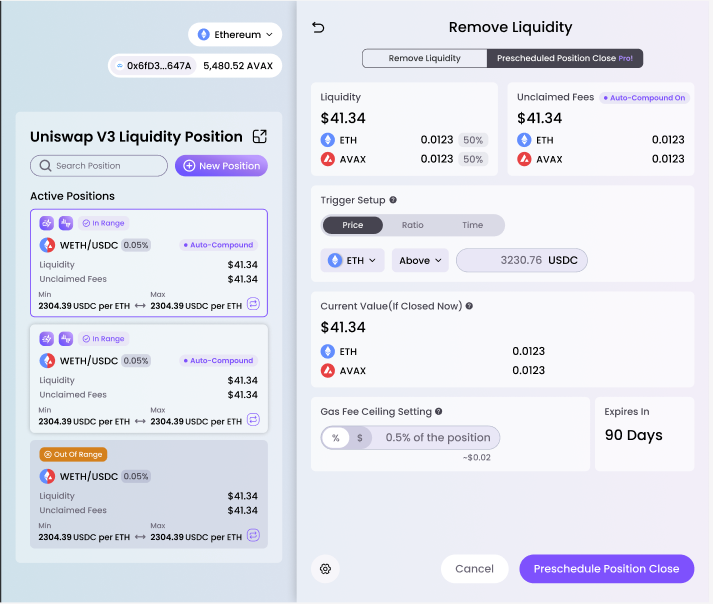
**High level:** You can setup position closure triggers based on pricing, pool ratio, and time. You can also select a time buffer for pricing or ratio based triggers.
**Value Add:** Aperture allows you to close out your position based on a price or ratio trigger without needing to constantly monitor market prices. **This is particularly useful for users who like to use CL LP positions to execute range orders!**
**Example:** If my ETH-USDC position becomes 100% ETH then close out my ETH-USDC position and return all the ETH to my wallet.
1. Select the NFT / active position you wish to create a prescheduled close for. You can find Prescheduled Close under advanced tools
2\. Similar to Automated Rebalance you can now choose a Trigger Setup based on Price, Ratio, or Time.
You will also choose a Gas Fee Ceiling based on percentage of position or a dollar amount (which we convert back into a percentage of position).